CXF MTOM Client

CXF MTOM Client explains step by step details of creating a MTOM Client in order to upload large attachments in SOAP based services
MTOM is used for encoding binary data in base64Binary and send as binary attachment than keeping it with actual SOAP message. MTOM is approved by WC3 and is a standard. MTOM very useful for transfering binary data such as MS documents, PDF, images etc. MTOM uses XML-binary Optimized Packaging (XOP) packages for transmitting binary data
For publishing a CXF Web MTOM Service, you need to follow CXF File Upload With SOAP MTOM.
This MTOM client is generated after the deployment of above service.
Required Libraries
You need to download following libraries in order to run CXF MTOM Client
- OpenJDK 8 / Corretto
- Eclipse 4.15
- For running this client you need to refer the classes generated on CXF File Upload With SOAP MTOM
CXF MTOM Client
import java.io.File;
import java.util.HashMap;
import java.util.Map;
import javax.activation.DataHandler;
import javax.activation.DataSource;
import javax.activation.FileDataSource;
import org.apache.cxf.ext.logging.LoggingInInterceptor;
import org.apache.cxf.ext.logging.LoggingOutInterceptor;
import org.apache.cxf.jaxws.JaxWsProxyFactoryBean;
import com.student.FileUploader;
import com.student.UploadService;
public final class Client {
public static void main(String args[]) throws Exception {
JaxWsProxyFactoryBean factory = new JaxWsProxyFactoryBean();
Map<String,Object> props = new HashMap<String, Object>();
factory.getOutInterceptors().add(new LoggingOutInterceptor());
factory.setServiceClass(UploadService.class);
factory.setAddress("http://localhost:8080/CXFUpload/Upload?wsdl");
UploadService client = (UploadService) factory.create();
FileUploader file = new FileUploader();
file.setName("copy");
file.setFileType("txt");
DataSource source = new FileDataSource(new File("/opt/upload/original.txt"));
file.setDfile(new DataHandler(source));
client.uploadFile(file);
System.exit(0);
}
}
Output
May 17, 2020 6:23:36 PM org.apache.cxf.wsdl.service.factory.ReflectionServiceFactoryBean buildServiceFromClass
INFO: Creating Service {http://student.com/}UploadServiceService from class com.student.UploadService
May 17, 2020 6:23:36 PM org.apache.cxf.ext.logging.slf4j.Slf4jEventSender performLogging
INFO: REQ_OUT
    Address: http://localhost:8080/CXFUpload/Upload?wsdl
    HttpMethod: POST
    Content-Type: multipart/related; type="application/xop+xml"; boundary="uuid:91626194-8a24-430e-ad43-e6df8fac836f"; start="<root.message@cxf.apache.org>"; start-info="text/xml"
    ExchangeId: d0a4fd95-65f4-43fe-a5a9-b805202430ff
    ServiceName: UploadServiceService
    PortName: UploadServicePort
    PortTypeName: UploadService
    Headers: {SOAPAction="", Accept=*/*}
    Payload:
--uuid:91626194-8a24-430e-ad43-e6df8fac836f
Content-Type: application/xop+xml; charset=UTF-8; type="text/xml"
Content-Transfer-Encoding: binary
Content-ID: <root.message@cxf.apache.org>

<soap:Envelope xmlns:soap="http://schemas.xmlsoap.org/soap/envelope/"><soap:Body><ns2:uploadFile xmlns:ns2="http://student.com/"><file><dfile><xop:Include xmlns:xop="http://www.w3.org/2004/08/xop/include" href="cid:6fd21531-3a71-415e-96d7-3651df59b95d-1@cxf.apache.org"/></dfile><fileType>txt</fileType><name>copy</name></file></ns2:uploadFile></soap:Body></soap:Envelope>
--uuid:91626194-8a24-430e-ad43-e6df8fac836f
Content-Type: text/plain
Content-Transfer-Encoding: binary
Content-ID: <6fd21531-3a71-415e-96d7-3651df59b95d-1@cxf.apache.org>
Content-Disposition: attachment;name="original.txt"

This is a test for mtom upload

--uuid:91626194-8a24-430e-ad43-e6df8fac836f--

May 17, 2020 6:23:36 PM org.apache.cxf.ext.logging.slf4j.Slf4jEventSender performLogging
INFO: RESP_IN
    Address: http://localhost:8080/CXFUpload/Upload?wsdl
    Content-Type: multipart/related; type="application/xop+xml"; boundary="uuid:c9d34db7-375b-4551-8e14-c101eaa26c62"; start="<root.message@cxf.apache.org>"; start-info="text/xml"
    ResponseCode: 200
    ExchangeId: d0a4fd95-65f4-43fe-a5a9-b805202430ff
    ServiceName: UploadServiceService
    PortName: UploadServicePort
    PortTypeName: UploadService
    Headers: {Keep-Alive=timeout=20, connection=keep-alive, content-type=multipart/related; type="application/xop+xml"; boundary="uuid:c9d34db7-375b-4551-8e14-c101eaa26c62"; start="<root.message@cxf.apache.org>"; start-info="text/xml", Content-Length=407, Date=Sun, 17 May 2020 16:23:36 GMT}
    Payload:
--uuid:c9d34db7-375b-4551-8e14-c101eaa26c62
Content-Type: application/xop+xml; charset=UTF-8; type="text/xml"
Content-Transfer-Encoding: binary
Content-ID: <root.message@cxf.apache.org>

<soap:Envelope xmlns:soap="http://schemas.xmlsoap.org/soap/envelope/"><soap:Body><ns2:uploadFileResponse xmlns:ns2="http://student.com/"/></soap:Body></soap:Envelope>
--uuid:c9d34db7-375b-4551-8e14-c101eaa26c62--
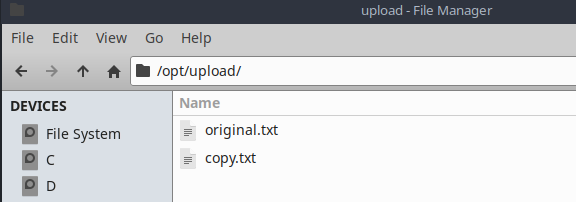
Below you can see original.txt is uploaded as copy.txt using mtom
I tried this approach it worked for me well as my client requirement is to upload file sizes of greater then 100 mb when iam trying to upload file size of more then 100mb i am facing below error\ Sep 3, 2013 8:06:49 AM org.apache.cxf.phase.PhaseInterceptorChain doDefaultLogging WARNING: Interceptor for {http://service.com/}FileUploadSEIService#{http://service.com/}uploadFile has thrown exception, unwinding now org.apache.cxf.interceptor.Fault: Response was of unexpected text/html ContentType. Incoming portion of HTML stream: Error 500: java.lang.OutOfMemoryError at org.apache.cxf.interceptor.StaxInInterceptor.handleMessage(StaxInInterceptor.java:79) at org.apache.cxf.phase.PhaseInterceptorChain.doIntercept(PhaseInterceptorChain.java:263) at org.apache.cxf.endpoint.ClientImpl.onMessage(ClientImpl.java:799) at org.apache.cxf.transport.http.HTTPConduit$WrappedOutputStream.handleResponseInternal(HTTPConduit.java:1627) at org.apache.cxf.transport.http.HTTPConduit$WrappedOutputStream.handleResponse(HTTPConduit.java:1494) at org.apache.cxf.transport.http.HTTPConduit$WrappedOutputStream.close(HTTPConduit.java:1402) at org.apache.cxf.io.CacheAndWriteOutputStream.postClose(CacheAndWriteOutputStream.java:47) at org.apache.cxf.io.CachedOutputStream.close(CachedOutputStream.java:195) at org.apache.cxf.transport.AbstractConduit.close(AbstractConduit.java:56) at org.apache.cxf.transport.http.HTTPConduit.close(HTTPConduit.java:649) at org.apache.cxf.interceptor.MessageSenderInterceptor$MessageSenderEndingInterceptor.handleMessage(MessageSenderInterceptor.java:62) at org.apache.cxf.phase.PhaseInterceptorChain.doIntercept(PhaseInterceptorChain.java:263) at org.apache.cxf.endpoint.ClientImpl.doInvoke(ClientImpl.java:533) at org.apache.cxf.endpoint.ClientImpl.invoke(ClientImpl.java:463) at org.apache.cxf.endpoint.ClientImpl.invoke(ClientImpl.java:366) at org.apache.cxf.endpoint.ClientImpl.invoke(ClientImpl.java:319) at org.apache.cxf.frontend.ClientProxy.invokeSync(ClientProxy.java:88) at org.apache.cxf.jaxws.JaxWsClientProxy.invoke(JaxWsClientProxy.java:134) at $Proxy32.uploadFile(Unknown Source) at FileUploadClient.main(FileUploadClient.java:53) Exception in thread "main" javax.xml.ws.soap.SOAPFaultException: Response was of unexpected text/html ContentType. Incoming portion of HTML stream: Error 500: java.lang.OutOfMemoryErro We deployed server side code in WEBSPHERE Server.. can any one help me out with above issue@chandra shekar, You need to add following 3 lines into invoking client, I have updated CXF MTOM Client, please check Map<String,Object> props = new HashMap<String, Object>(); props.put("mtom-enabled", Boolean.TRUE); factory.setProperties(props);Hi, I tried by adding mtom-enabled property to props in client side as per your suggestion. It works fine with file sizes of less then 500mb. The server max memory size is 1024M equal to more then 1 GB. I am facing same issue when i try to upload more then 500mb file sizes. i am getting below error... Could you help me whethe this is client side issue or server side issue. Let me know can we upload file sizes more then 500 mb .. Sep 6, 2013 4:06:49 AM org.apache.cxf.phase.PhaseInterceptorChain doDefaultLogging WARNING: Interceptor for {http://service.com/}FileUploadSEIService#{http://service.com/}uploadFile has thrown exception, unwinding now org.apache.cxf.interceptor.Fault: Response was of unexpected text/html ContentType. Incoming portion of HTML stream: Error 500: java.lang.OutOfMemoryError at org.apache.cxf.interceptor.StaxInInterceptor.handleMessage(StaxInInterceptor.java:79) at org.apache.cxf.phase.PhaseInterceptorChain.doIntercept(PhaseInterceptorChain.java:263) at org.apache.cxf.endpoint.ClientImpl.onMessage(ClientImpl.java:799) at org.apache.cxf.transport.http.HTTPConduit$WrappedOutputStream.handleResponseInternal(HTTPConduit.java:1627) at org.apache.cxf.transport.http.HTTPConduit$WrappedOutputStream.handleResponse(HTTPConduit.java:1494) at org.apache.cxf.transport.http.HTTPConduit$WrappedOutputStream.close(HTTPConduit.java:1402) at org.apache.cxf.io.CacheAndWriteOutputStream.postClose(CacheAndWriteOutputStream.java:47) at org.apache.cxf.io.CachedOutputStream.close(CachedOutputStream.java:195) at org.apache.cxf.transport.AbstractConduit.close(AbstractConduit.java:56) at org.apache.cxf.transport.http.HTTPConduit.close(HTTPConduit.java:649) at org.apache.cxf.interceptor.MessageSenderInterceptor$MessageSenderEndingInterceptor.handleMessage(MessageSenderInterceptor.java:62) We deployed server side code in WEBSPHERE Server.. can any one help me out with above issue