JFreeChart Example

JFreeChart Example explains about How to create chart using JFreeChart library
How To Create Pie Chart Using JFreeChart library?
Consider a situation where you need to show dynamic (ie; data is populated dynamically) charts such as Pie Chart, Line Chart, Bar Chart, Bubble Chart, Polar Chart, Wind Chart etc, in your application. In that case you can use JFreeChart
JFreeChart is a free and open source java chart library used for creating professional quality charts. JFreeChart is purely written in java language, we can very easily incorporate JFreeChart in our java standalone and web applications.
Referenece - > http://www.jfree.org/jfreechart/
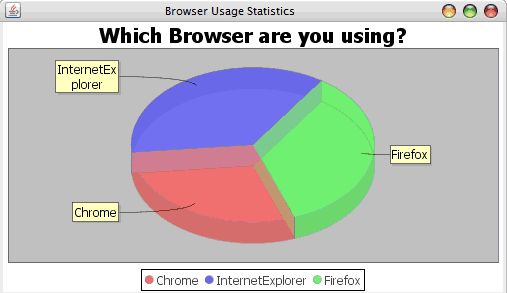
Here I am showing an example about How to create a Pie Chart using JFreeChart.
Required Libraries
You need to download
Following jar must be in classpath
- jfreechart-1.5.0.jar
- jcommon-1.0.24.jar
pom.xml
<dependency>
	<groupId>org.jfree</groupId>
	<artifactId>jfreechart</artifactId>
	<version>1.5.0</version>
</dependency>
<dependency>
	<groupId>org.jfree</groupId>
	<artifactId>jcommon</artifactId>
	<version>1.0.24</version>
</dependency>
We can create following professional quality charts by using jfreechart.
- Single valued Charts such as compass, speedometer, thermometer
- Line Chart
- Pie Chart
- Bar Chart
- Bubble Chart
- Wind Chart
- Polar Chart
JFreeChart Example
import org.jfree.chart.ChartFactory;
import org.jfree.chart.ChartPanel;
import org.jfree.chart.JFreeChart;
import org.jfree.chart.plot.PiePlot;
import org.jfree.data.general.DefaultPieDataset;
public class JFreeChartExample extends JFrame {
private static final long serialVersionUID = 1L;
public JFreeChartExample(String applicationTitle, String chartTitle) {
super(applicationTitle);
//Creates a sample dataset
DefaultPieDataset dataSet = new DefaultPieDataset();
dataSet.setValue("Chrome", 29);
dataSet.setValue("InternetExplorer", 36);
dataSet.setValue("Firefox", 35);
// based on the dataset we create the chart
JFreeChart pieChart = ChartFactory.createPieChart3D(chartTitle, dataSet, true, true, false);
PiePlot plot = (PiePlot) pieChart.getPlot();
plot.setStartAngle(290);
plot.setForegroundAlpha(0.5f);
// Adding chart into a chart panel
ChartPanel chartPanel = new ChartPanel(pieChart);
// settind default size
chartPanel.setPreferredSize(new java.awt.Dimension(500, 270));
// add to contentPane
setContentPane(chartPanel);
}
public static void main(String[] args) {
JFreeChartExample chart = new JFreeChartExample("Browser Usage Statistics", "Which Browser are you using?");
chart.pack();
chart.setVisible(true);
}
}
Output